Platform · Case history
Let your case tell you the whole story
A chronological view of events: keep a full overview of documents and actions from different points of view.
Trusted by legal teams at

















In the product
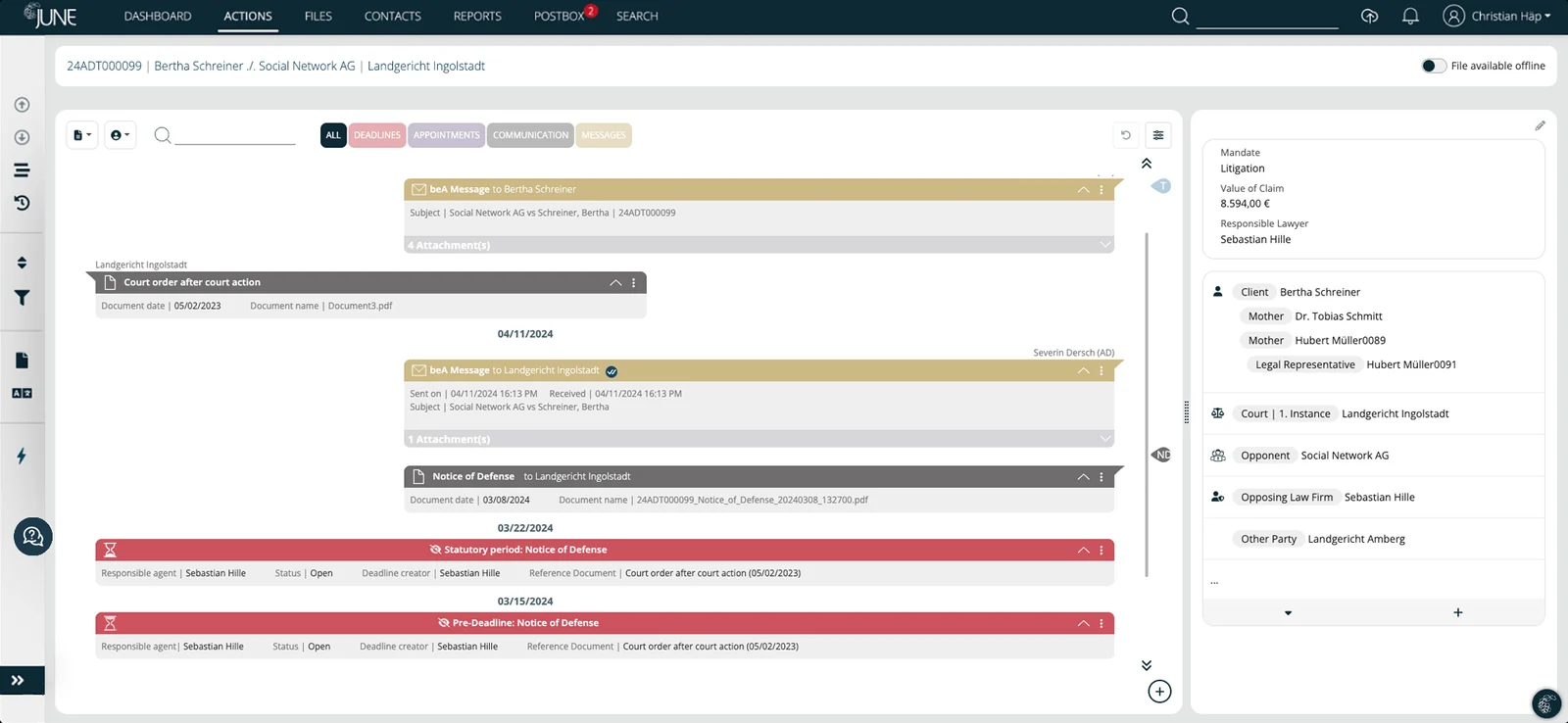
Full control through a timeline-style view of actions and documents for each case
At a glance Fast, interactive and comprehensive
-
Fast and clear
Easier to understand than traditional tables, with faster information retrieval.
-
Interactive
Direct access to all relevant items in the case history.
-
Comprehensive
A full overview of all case-related activities.
Key facts
- Deadlines, dates and communications in chronological order
- Communication broken down by participant
- Filter and search
- Completed items visible again as inactive elements
- Milestones presented as a storyline
- One click to the source document
- Chat-inspired, color-coded interface
In detail
Case history
What JUNE does – and how it fits into the rest of your case management.
- 01
The full story
Deadlines and dates, as well as all communications within a file, are presented in the correct temporal context and in chronological order. Communication is broken down by participant, and all information is filterable and searchable. Completed deadlines, past appointments and completed actions can be made visible again at any time as inactive elements.
- 02
Intelligent interactions
Interactive elements give access to details, documents and people. Every element in the timeline is clickable and leads to detailed views of tasks, documents and the people involved. Key information is tagged and leads directly to the source document with a single click. Special events within a file are defined as milestones and presented as a storyline, so you can jump back and forth between key documents even faster – without the hassle of scrolling. Filtering and search make it even easier to use.
- 03
Clear interface
The case history is displayed in a familiar interface inspired by chat solutions, with threads in chronological order. Color coding enhances the user experience and reduces cognitive load. Instead of sifting through endless tables or disconnected records, users get a clean, unified and interactive timeline of all actions, documents and interactions related to a case or project.
- 04
More context for decision-making
In complex legal and high-volume operational workflows, context is everything. With all relevant information centralized in one place, users make faster decisions, spot inconsistencies and keep a clear audit trail of every step taken. This contextual awareness allows both the system and you to make better decisions about the next steps in each case.

“The entire case history can be displayed clearly and transparently, and we can provide relevant documents quickly and in one central place.”

Where teams use it
Solutions built on this feature
Law firms
Take on the largest mass and complex litigation mandates from day one: JUNE automates intake, deadlines, correspondence and client reporting for law firms.
ExploreMass litigation
Manage thousands of parallel proceedings with consistent arguments, automated deadlines and on-demand reporting – for plaintiffs and defendants alike.
ExploreClaims handling
Industry-neutral claims automation: capture, validate and resolve high-volume claims with straight-through processing and full auditability in one platform.
ExploreKeep exploring
More from the JUNE platform
Data extraction
Generative AI classifies every incoming document and extracts parties, courts, deadlines, claims, decisions and rulings, dates and addressees – each value linked to its source.
ExploreWorkflow automation
Rule-based and agentic workflows in a no-code, flowchart-style builder – customized and shared per team and partner, with deadlines and SOPs built in.
ExploreAnalytics & reports
A live dashboard, filterable case lists, flexible charts and historic and predictive analytics – exportable to Excel and CSV.
ExploreReady to modernize and simplify legal work?
Get started with case management automation today – we’ll show you how JUNE would run your process.